Showing posts with label POTA. Show all posts

QRP for Beginners: The Pros, Cons, and Best Radios to Start With

An Amateur Radio Operator operating QRP in a field


Are QRP Rigs Worth It? Exploring Low-Power Ham Radio for Parks on the Air

QRP Rigs: Are They the Future of Ham Radio?

Ever wondered if low-power (QRP) ham radios are worth the investment? Jack, aka Whiskey 3 Charlie Tango (W3CT), dives deep into his personal experience using QRP rigs, exploring their advantages and limitations in real-world activations. From building antennas to logging contacts with just 5 watts (or less!), Jack shares why he believes QRP radios have a solid place in the ham radio community.

If you’re new to Parks on the Air (POTA) or just curious about compact radio setups, this video is a must-watch. Let’s break down the key takeaways and best practices for making the most of QRP operations!


🎙 About the Creator - Jack (W3CT) and His Ham Radio Journey

Jack, known as Whiskey 3 Charlie Tango (W3CT), shares his ham radio journey through his YouTube channel, offering insights on portable radio setups, antenna-building, and real-world activations. His channel is an invaluable resource for new and experienced radio enthusiasts looking to improve their on-air experience.

📺 Check out his channel here: Jack’s Ham Radio Journey (Insert actual link if available)


🔑 Key Takeaways from the Video

  1. QRP radios are more powerful than you think – Even with just 5 watts, you can make solid contacts if conditions are right.
  2. Antenna setup matters – Jack’s homemade 40m end-fed half-wave antenna proved to be a game-changer.
  3. CW (Morse code) is king for QRP – Many QRP rigs are optimized for CW, making it an excellent mode for low-power activations.

📡 Step-by-Step: How to Get Started with QRP Radios

  1. Choose the right QRP rig – Radios like the QMX or the G90 (when turned down to 5W) are great options.
  2. Set up a lightweight antenna – Jack used a 40m end-fed half-wave with a DX Commander mast for great results.
  3. Find the best location – Parks, remote areas, or elevated terrain help boost signal reach.
  4. Adjust your settings – Keep SWR in check and experiment with antenna positioning for optimal results.
  5. Log your contacts – Apps like Hammers make logging seamless during activations.
  6. Keep practicing CW – It’s one of the most effective modes for making contacts with low power.

🛠️ Resources Mentioned

  • QMX QRP Rig – A compact, budget-friendly radio ideal for CW and FT8 modes.
  • Xiegu G90 – A versatile HF radio that can be turned down to QRP levels.
  • Hammers App – A logging app that makes recording contacts easier.
  • DX Commander Mast – A durable and portable antenna support system.
  • End-Fed Half-Wave Antenna – Jack’s homemade antenna setup that worked exceptionally well.


📢 My Expert Advice on QRP Radios

As a ham radio enthusiast, I believe QRP operations are a great way to challenge your skills while keeping your setup portable and affordable. If you're into Parks on the Air (POTA) or Summits on the Air (SOTA), a lightweight QRP rig can be a game-changer. However, antenna placement and propagation awareness are key to making successful contacts. Don't be discouraged if conditions aren't great—keep experimenting, and you'll be amazed at what 5 watts can do!


❓ Frequently Asked Questions (FAQ)

1. What is a QRP rig?
A QRP rig is a low-power ham radio transmitter, typically operating at 5 watts or less.

2. Is QRP good for beginners?
Yes and no—it's great for learning efficiency, but beginners may struggle with weak signals and need patience.

3. Can I use SSB on a QRP radio?
Some QRP rigs support SSB, but CW and digital modes (like FT8) are more effective with low power.

4. What’s the best QRP antenna?
An end-fed half-wave (EFHW) or a dipole antenna works great for portable QRP setups.

5. How far can a QRP signal reach?
Under good conditions, QRP signals can reach hundreds or even thousands of miles—Jack logged Florida and Connecticut with just 5 watts!

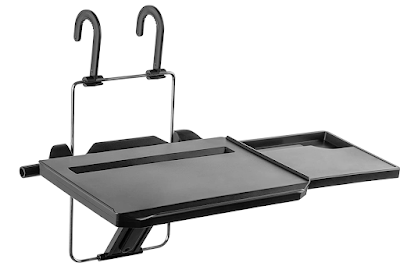


Ham Radio Gear: The Mount-It Car Desk @ POTA K-0481


mount-it-car-desk


Are you a #POTA or Parks on the Air QRPer? Do you like to operate year round like me? Then you might consider picking up a Mount-It Car Desk. My car desk arrived the other day and I wanted to try it out for an activation. The weather was clear but very windy that day, so I had the excuse I needed to try out the car desk. 

Off to Werthiem K-0481 for my first attempt. As you can see from the photo it worked out well. The car desk easily handled the weight of the rig and battery as well as my heavy hand on the KX3 QRPGUYS paddle kit.  For notepad logging, the pull out side panel was also the perfect size. 

mount-it-car-desk


If you are one of those QRP nuts like me who enjoy activating for Parks on the Air year round, the Mount-It Car Desk will an asset to you. Of course the car desk can also be mounted on the steering wheel for other uses like working a laptop or reading. Since I have plenty of time sitting in the car between appointments, the Mount-It car desk will get a workout. 

Get Your Mount-It Car Desk here.


How to Set Up a Portable Antenna in Under 3 Minutes


Introduction

Are you a ham radio operator looking to set up a portable antenna quickly and easily? In this video, Richard and Tony take on a challenge to set up the JPC12 antenna in under 3 minutes, and they succeed!

 They go through the step-by-step process of setting up the antenna, including attaching the ground spike, radial system, feed point, mast parts, and the coil and telescopic whip. They also explain how to tune the antenna and test the SWR with a rig expert.

 I believe that this video is valuable for anyone who is interested in portable antennas. The JPC12 antenna is a great option for those who need a reliable, portable antenna for outdoor use, and this video provides clear instructions on how to set it up quickly and easily.

 Creator Bio: The video was created by the UK-based YouTube channel, Essex Ham. The channel provides information and resources for amateur radio enthusiasts, including tutorials, reviews, and news. They also offer a weekly live show, podcast, and a community forum. You can find more information on their website at essexham.co.uk.

 Key Takeaways:

  • The JPC12 antenna is a portable and reliable option for ham radio operators.
  • Setting up the antenna can be done in under 3 minutes with a few simple steps.
  •  Tuning the antenna and testing the SWR is an important part of the setup process. 

Step-by-Step Process:

  1.      Attach the ground spike to the antenna and secure it in place.
  2.      Spread out the radial system and attach it to the ground spike.
  3.      Attach the feed point and mast parts to the antenna.
  4.      Attach the coil and telescopic whip to the feed point.
  5.      Tune the antenna by adjusting the coil and testing the SWR with a rig expert.

"The lower you are on the coil, the more you are to 40 meters basically, and then you work your way up as you're tuning."

 Resources Mentioned:

  1. JPC12 antenna: a portable, multiband HF antenna.
  2. Rig expert: a tool for testing SWR and antenna performance.
  3. Click To View the JP12 Portable Antenna on Amazon. (Affiliate Link)

KE2YK's Input:

As an expert in ham radio, my advice is to practice setting up your antenna before you go out into the field. This will help you become more efficient and confident in your setup process. Also, make sure to test your antenna's SWR to ensure that it is working properly and efficiently.

Who Is KE2YK:

 Gary Utz (KE2YK) is an amateur radio operator and blogger based in New York, USA. He is the author of the blog ke2yk.com, which focuses on amateur radio topics such as antenna building, radio contests, and equipment reviews. Gary has been a licensed amateur radio operator for many years and is an active member of the amateur radio community. On his blog, he shares his experiences and insights about the hobby, as well as tips and  advice for other amateur radio enthusiasts.

 FAQ:

Q: Can the JPC12 antenna be used for all bands? A: The JPC12 antenna covers 40 meters to 6 meters, making it a multiband antenna option.

Q: Is it easy to transport the JPC12 antenna? A: Yes, the JPC12 antenna is designed to be portable and can be easily transported in a backpack or carrying case.

Q: Do I need any special tools to set up the JPC12 antenna? A: No, the JPC12 antenna comes with all the necessary components and can be set up with just a few basic tools.

Q: What is SWR? A: SWR (standing wave ratio) is a measurement of the efficiency of an antenna. A higher SWR can indicate that the antenna is not working properly.

Q: How do I know if my antenna is working properly? A: Testing the SWR with a tool like a rig expert can help you determine if your antenna is working efficiently.

Related Posts:

The HB9SL 2 Element 20m VP2E QRP Antenna
The Elecraft AX1 Window Mount
The Slinky Vertical Antenna Experiment
Arborist Throw Lines For Portable Antennas
How To Build A Cheap Tilt Over Tower


Parks on the Air K-2147


Just a quick note. I plan to activate Sunken Meadow State Park K-2147 today, February 26th, some time around 18:00 UTC. It's a popular spot for Ham Radio operators and a watering hole for the LIQRP group. Should you hear me on the air, please spot me.

Sunken Meadow State Park is a stunning natural park located in Suffolk County, New York. The park is spread over 1,287 acres and features a range of scenic landscapes, including a beach, a saltwater marsh, and dense forests. The beach stretches for almost a mile along the Long Island Sound.

The park has hiking and biking trails through the park's forests and wetlands. For hikers, the Greenbelt Trail connects to other parks on Long Island.

Sunken Meadow State Park's history dates back to the 17th century, when it was the home of the Matinecock Native American tribe. The tribe used the area for hunting, fishing, and farming. Evidence of their presence can still be seen today.

During the 19th century, the Europeans farmed the land. New York State acquired the land in the 1920s and began developing the area into a park. The park first opened in 1931 and over the years it size was expanded. During the depression, the Conservation Corps built the park to what it has become today.

 Sunken Meadow State Park is a must visit place which offers something for everyone.

Until Next Time - 72 de KE2YK

How Do You Log Your POTA and SOTA Activations?

Some of the more interesting and useful storage and carry bags for traveling with QRP equipment was hosted by Josh KI6NAZ, purveyor of HRCC over on his YouTube channel recently. Tom K4SWL purveyor of QRPer.com was Josh’s guest speaker who presented a whole host of bags that he uses for travel and his POTA activations. Two companies that really stood out for me during the presentation were bags by RED OXX and Tom BIHN! All of these bags are American made with lifetime guarantees. And, of course they come with a price.

POTA activations are something I enjoy when time permits. As a result I am always on the hunt to improve my activations. During my field ops I mainly carry my Elecraft KX3, Elecraft AX1 and my Bioenno 12V 3Ah battery. Trying to minimize extra weight and provide adequate space for radio gear and necessities is always a challenge. Tom BIHN gear is definitely in my future plans.  

 Regarding field ops, IMHO, the most important gear is the log. POTA and SOTA logs are what an activation is all about! A tablet or laptop is nothing more than a huge inconvenience. When I sit down to operate it’s all about getting the job done, not tinkering around with a tab key or space bar. At home, after the activation is when I use HAMRS to enter my data and ADIF Master to validate my log. Then and only then do I upload the log to the POTA site.

 Anyway, my method of logging is plain and simple paper and pencil. Writing calls, time and state down takes enough time especially when one of those mini pileups happen! But the paper itself should not be so simple!

 So what kind paper log do I use? Well I’ve tried the clipboard and the logging sheets downloaded from various Web sites. That does not work for me either, it’s way too clumsy.

Rite in the Rain Logbook
Some time ago, my friend and fellow Ham Nehal, N3HAL gave me a Rite in the Rain 4x6 top spiral notebook.

Now if you have never heard of Rite in the Rain, you’re not alone. After recently investigating the Rite in the Rain Web site, I found they have a diverse set of products and gear for writing in far less than desirable conditions.

 If you log in places that are humid or places like POTA and SOTA where dampness or mist along with the QRM may be part of your activations, you may want to take a serious look at the Rite in the Rain line of products.

 Not only do they sell notepads but they also sell what they call kits which include a waterproof cover and special pen. Again, this gear is more expensive than you’d imagine but what good is a ruined log! Once you have the kit, only a new notebook will be needed long into the future.   

 My next purchase from Rite in the Rain will be their 973-kit which consists of an all-weather pen, a Cordura protective cover and 4.6x7 side spiral notebook.  

 Here are the Rite in the Rain general product benefits as they list on their Web site:

·       Permanent ink writes through water, sweat, grease, and mud without clumping or smearing.

·       Our scrappy notebook will survive sweat, rain, mud, snow, oil, grease, and the wear-and-tear of daily use.

·       All-purpose pockets make it easy to organize your small field essentials and safeguard your notes.

72 until next time de KE2YK

HAMRS Logging App - Where Every Day Is Field Day


 HAMRS (1.0.6) is a multi-platform logging app that is used as a generic, parks on the air, summits on the air, ARRL field day or ARRL winter field day logger.

HAMRS is available for Windows, MacOS, Ubuntu (LINUX) and Raspian (Raspberry Pi). HAMRS is also available in 32 bit format. 

The app provides for multiple profiles. For each profile, settings is where you choose to enable expanded mode, call sign look ups, notifications and the site used for call sign look ups.  I don't use multiple profiles but my guess is only the logs associated with that profile are displayed.  

The HAMRS Community site is where you can view the latest bug fixes and enhancements to the app. The Community page also includes a request for enhancements section. 

I often use HAMRS on Windows as a hunter and have run the app on both Ubuntu and Raspian platforms as an activator.

All logging formats include automated call sign look ups and the ability to export logs into .adif format. 

At of the time of this post, the POTA system now allows for direct upload of .adif activator logs. If you are using Windows, running your activator log through ADIF Master prior to uploading it is a step I recommend taking.

Logging formats are:

Generic logging with automated call sign look ups and a cool QSO map. 

Parks on the Air logging for both activators and hunters.

For POTA hunters, POTA spots are shown on a QSO map and spots are displayed in linear or card format. Spot display options include choosing mode such as CW, FT8 or SSB as well as hiding  QRT stations and logged contacts. Spots can also be ordered by time or frequency.

Summits on the Air logging for activators. The format is much the same as the POTA format with the name Summit instead of Park.

ARRL Field day and Winter Field day logging contains the expected fields to capture class and section for a single op. To my knowledge there is no provision for network logging. 

Since the first release of HAMRS, the app has become very stable. Bug fixes and user requests have been incorporated into the work in progress. IMHO, I think HAMRS has a great future ahead. 


 Which logging features of HAMRS do you use. How would you improve HAMRS? 

72 de @ke2yk 

Good News for Parks On The Air Operators

Parks on the Air

Hey! Do you operate for the Parks on the Air program? Yeah? Then you will be excited to find out that you can directly upload your logs to the POTA program. Here is the message from the Parks on the Air web site. 

After 12:00 Zulu (9AM Eastern Time USA) Friday, July 1, and once you have logged into the http://pota.app site, you will notice "My Log Uploads" as an option in our menu. Immense thanks WR5B and N0AW! 

Until July 1st, logs has to be submitted via an area coordinator. Since interest in the Parks on the Air program has grown exponentially, I'd imagine that the amount of work for coordinators was getting out of hand. 

There have been a few instances where I had to embarrass myself by resubmitting the same log a few times due to my dumb mistakes. 

Then I learned about a free Windows program called ADIF Master which points out those dumb mistakes. ADIF Master's built in editor allows you to make changes directly to the log file and then recheck the log for errors. Needless to say running ADIF Master BEFORE submitting logs has saved the coordinator time and frustration.

Anyway, Mike K8MRD has a video demonstrating how simple the upload process is going to be. At the time Mike made this video the upload process was still in Beta testing. My thinking is to still run my logs through through ADIF Master prior to uploading via the new method. 


Thanks to all who have made the Parks on the Air program what it is today and the effort to bring direct log submissions to the program.